

LinkedIn Job Search Tip!
On LinkedIn you can advertise publicly or privately that you’re looking for work.
If you’re looking for work but you don’t like the green banner displaying you’re Open to Work, did you know you can set it up so that nothing is visible on your profile, but you are still signalling to recruiters that you are looking?
At the top of your profile, there’s a box which says “Show recruiters you’re open to work” and then “Get started”.
If you go into this area, you can add 5 job titles you are interested in (they are pre-defined names so type and see what comes up), 5 locations, the type of work (on-site, hybrid or remote), whether it’s a full time, part time, contract, interim or temporary role, and then who you want to signal to.
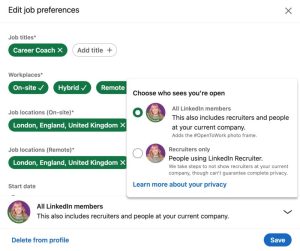
If you select recruiter view, this means anyone who uses LinkedIn recruiter will be notified you are looking for work if you come up in one of their searches. The exception is if you are working at a company who uses LinkedIn recruiter, you won’t come up in their searches to protect your privacy.
With this option, nothing changes visibly on your public profile, so nobody will know you are job seeking unless you tell them.
The other option, adds the #OpenToWork green banner to your photo and adds the job titles to the top of your profile.
It’s a great concept if you want your network to see you’re looking for work, because every time you like or comment on a post, your photo with the banner will be visible.
The other feature of the ‘public’ open to work is that you will be presented with the option to share a message in post form to say that you are open to work. This is a pre-formated template, but you can amend anything in here. LinkedIn have in the past reported that this post type gets a wide reach than a normal post, so it is well worth using this functionality to maximise the chance of it appearing in your networks newsfeed.
I’d really love to hear your views on the green banner – do you use it? Why or why not?
Please follow me Sarah Burgess for LinkedIn and job search tips!
